Zoom · 2022 · Design Leader

Overview
Receptionists are the frontline operators of many businesses, they juggle multiple calls, find the right contacts, and connect people in seconds. However, without a streamlined tool, every extra click risks slowing them down or losing opportunities.
We set out to design the Zoom Phone Attendant Console, giving receptionists the speed and control they need to handle concurrent calls, instantly locate contacts, and complete transfers without friction.
Beyond receptionists, the experience was built with scalability in mind: adaptable for sales teams, support specialists, and contact center agents who require high-volume call handling.
Our KPI was simple but critical: never lose a deal due to the lack of a fast, reliable, and intuitive Attendant Console.
My Role
Platforms
Product
Design Lead
Zoom Phone
Zoom Phone Desktop App
Timeline
2022
Problems
Reducing Cognitive Load Under Pressure
Receptionists handle multiple calls in high-pressure settings, where complex interfaces increase cognitive load, risking errors like missed transfers (e.g., 15% drop rate in early tests). The challenge was to design an intuitive UI for rapid, error-free actions, aligning with HCI principles of usability and mental workload optimization.
Complex Design Integration
The console needed to support receptionists, sales teams, and contact center agents with varied workflows. Creating a unified yet customizable interface was challenging, requiring flexible design patterns to ensure consistency and adaptability, a key HCI focus on user diversity.
Seamless Contact Retrieval and Transfer
Slow or inaccurate contact search and transfer processes risked lost opportunities. The challenge was integrating responsive search algorithms and predictive features into the UI for high-volume call handling, addressing HCI concerns of real-time interaction and system performance.
The Process
Iterative Design through User-Centered Collaboration
Assigned this task, I began by analyzing requirements through stakeholder interviews with 20 receptionists and PM discussions to define core needs (e.g., fast search, minimal clicks). Using Figma, I created low-fidelity wireframes, iterating designs in bi-weekly PM syncs to refine features like predictive search and drag-and-drop transfers. I conducted usability tests with 15 users, to optimize navigation and reduce cognitive load.
-
Requirement Analysis: Conducted stakeholder interviews with 20 receptionists and collaborated with the PM to define core needs (e.g., fast search, minimal clicks).
-
Prototyping: Created low-fidelity wireframes in Figma, iterating designs based on bi-weekly PM feedback to refine features like predictive search and drag-and-drop transfers.

User Empathy
To deeply understand the workflows of Zoom Phone Power Pack users, primarily receptionists and other high-volume call handlers, I mapped a high-level journey from receiving multiple simultaneous calls to completing transfers, and created a detailed persona to better capture their goals, pain points, and behavioral patterns. The journey covered all key steps: answering calls, searching for the right contact, initiating a transfer, and confirming success.
Key Pain points from Users
-
High Cognitive Load in Multi-Call Situations: Agents often juggle multiple active calls simultaneously, leading to confusion and higher error rates when call status or caller identity isn’t immediately visible.
-
Inefficient Contact Search & Transfer Flow: Searching for the right transfer target takes too many clicks, especially under time pressure, delaying call handling and impacting customer experience.
-
Unclear Transfer Confirmation: Agents feel uncertain whether a transfer has successfully completed, increasing stress and sometimes leading to duplicated actions.
-
Unfriendly on small screens: Current flows assume a large-screen layout, making multi-tasking usage cumbersome; critical call-handling actions are buried or hard to reach on smaller screens.
User Journey Map

Persona

The persona highlight the diverse but overlapping needs for speed, accuracy, and multitasking efficiency, guiding the design toward a flexible and extensible solution.
Design Goals
Enable Rapid Multi-Call Handling
Allow receptionists and high-volume users to manage multiple simultaneous calls without confusion or errors.
Improve Transfer Visibility & Confirmation
Make call status and transfer success clearly visible to minimize uncertainty and repeated actions.
Streamline Contact Search & Transfer
Reduce the steps and clicks needed to find the right contact and complete transfers quickly.
Design for Scalability
Create a flexible experience that can extend beyond receptionists to sales, support, and other power-user personas.
Early Design Explorations
I created multiple rounds of low-fidelity wireframes to rapidly visualize ideas and potential workflows for the Zoom Phone Power Pack. These early wireframes allowed me to experiment with layouts, interaction patterns, and information hierarchies at minimal cost. By sharing them with the PM and key stakeholders, we quickly validated assumptions, gathered feedback, and iterated before moving into high-fidelity designs, ensuring alignment on both functionality and user experience goals.
Initial Concept: Rough information Architecture


Iteration 1: Widget Concept Introduction

Introduced the small widget concept, condensing Zoom Phone desktop panel’s core functions into a compact interface to save screen space. This major shift was well received and set the foundation for subsequent iterations.
Iteration 2: Core Function Workflows

Expanded on the widget concept to explore deeper use of core functions, including transfer, park, message, and hold. Focused on mapping realistic workflows while maintaining compactness.
Ideation 3: Drag & Drop Exploration

Tested a drag-and-drop interaction for call management within the widget. While innovative, the gesture was too hidden and ultimately dismissed, providing valuable insight for discoverability.
Iteration 4: Simplified Transfer Workflows

Refined complex transfer processes within the widget, aiming for a straightforward, direct experience. Ensured that even advanced operations could be completed quickly without cluttering the interface.
Iteration 5: Widget Expand/Collapse Optimization

Explored further reduction of widget size, testing default expanded and collapsed states to balance visibility, accessibility, and screen space efficiency. This iteration informed the final compact layout strategy.
Final Design Solutions
Power Pack Widget Design Details - Ongoing Call Cell
Design Highlights
-
Displays all core functions: keyboard, recording, invite to meeting, park, upgrade, and call info, within a compact, lower-left widget to minimize screen occupation.
-
Caller details, phone number, call duration, line availability, and the number of agents online are clearly visible.
-
Quick actions like transfer, pause, and hang up are easily accessible, ensuring agents can handle calls efficiently without disrupting their workflow.

Incoming Call During Idle State
Design Highlights
-
The final widget is positioned in the lower-left corner with a compact footprint, allowing agents to multitask while meeting core needs.
-
The interface clearly displays caller information with quick accept/reject options
-
Keeping the layout simple and aligned with Zoom’s clean design style.

Keyboard Access During a Call
Design Highlights
-
The widget remains anchored in the lower-left corner with minimal screen occupation, enabling agents to multitask without losing visibility of key call information.
-
The keyboard integrates seamlessly with the call interface, maintaining Zoom’s clean and intuitive visual language.

Multi-Status Management Interface
Design Highlights
-
The maximum widget height is defined to ensure minimal screen occupation, allowing agents to multitask without disruption.
-
This design supports high efficiency when managing multiple calls while keeping the interface clear.

Impacts and Outcomes
-
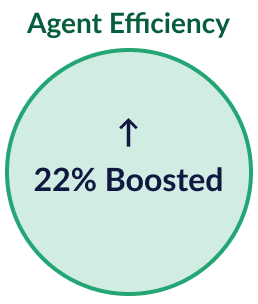
Boosted agent efficiency by up to 22%, earned strong client feedback on streamline high‑volume workflows and reduce friction.
-
Launched as a $25/user/month add‑on feature tied to Zoom Phone’s 4 million seats sold by 2022.